
Asynchronous subprocess loops in nAxiom
(nAxiom version 1.13.2.0)
Przeczytasz w 9 min.
Table of contents
Key information
- A subprocess block can be placed in a loop, that is, lead the output of the main process through the decision block and possibly other blocks back into the input of the subprocess block.
- Such a loop can be iterated automatically, based on a condition in the decision block, or manually, by using a manual task block with two outputs: to the subprocess and to the synchronizer (end of the loop).
- Before entering the synchronous subprocess block (also in the loop), it is recommended to use a 0 second wait block
Build a loop
The diagram below shows how to call an asynchronous subprocess in an iterated loop.
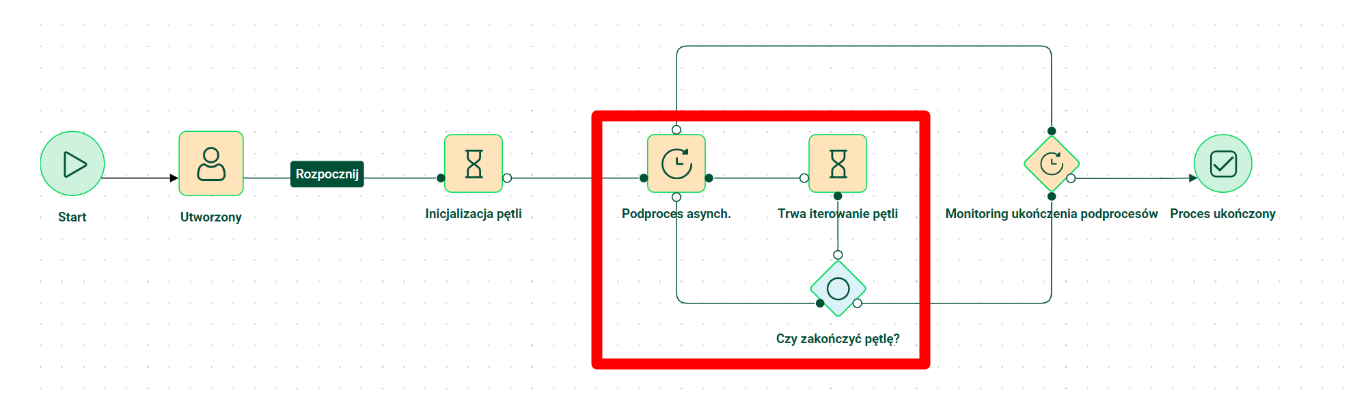
The loop consists of the following components:
- asynchronous subprocess block: the output of the main process led to the decision block, and the output of the subprocess status to the synchronizer,
- decision block: decides whether to continue the loop (go to the waiting block) or end it (go to the synchronizer),
- 0 sec wait block: its use at the entrance to the asynchronous subprocess block disables the screen lock (operation in progress icon), closes the previous transaction and opens a new one (each subprocess document is referenced in a separate transaction) and allows you to present the corresponding status in the main process (manual refresh of the form required).
Note that the output of the main process from the asynchronous subprocess block can only lead to the decision block or the synchronizer block. To invoke an asynchronous subprocess in a manually iterated loop, i.e. a manual task, it is necessary to use the decision block as a proxy.
Transaction processing in a loop
Using wait block in a loop, before returning to an asynchronous subprocess block causes each iteration of the loop, that is, each creation of a subprocess document, to be executed in a separate transaction. If an error occurs when creating a subprocess document, the loop execution will be aborted, but the documents created until the error occurs will not be affected.
In the case of a loop without a wait block, the error will break the loop and undo the transaction, that is, all documents created until the error occurs will be deleted.
When the user clicks the change status button, the transaction is opened and ends when the next status is reached. An in-progress icon is displayed when a transaction is executed, which locks the browser window. Because the call to the asynchronous subprocess, especially in the loop, can take some time, such a blockage reduces the comfort of using the application. Using the wait block closes the user initiated transaction and resumes the taskservice application after the set time. In this case, nAxiom does not lock the screen, so the user can perform other actions while initiating subprocesses takes place in the background.
In addition, the status of the waiting block can be used to inform the user about the processing status of the subprocess loop. However, please note that to view the status of the waiting block, you need to manually refresh the form.
Solution examples
You can use an auxiliary table, such as the one described in Designing subprocesses in nAxiom, to handle the processing of subprocesses in a loop. In this case, it will be filled in beforehand with data for the documents that are yet to be created. The table will store the root process ID and the unique ID of each subprocess and the flag that will change after each iteration.
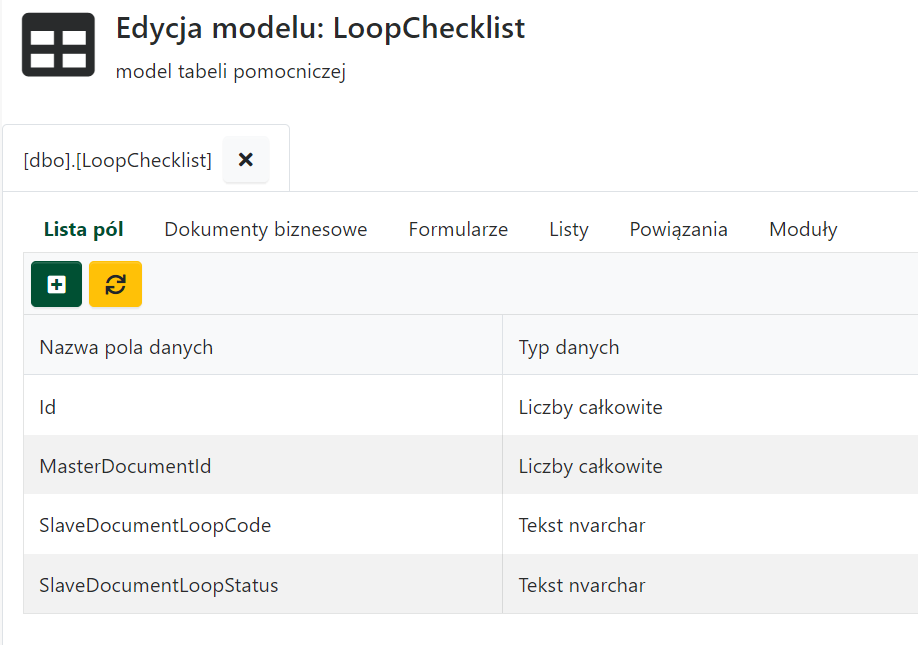
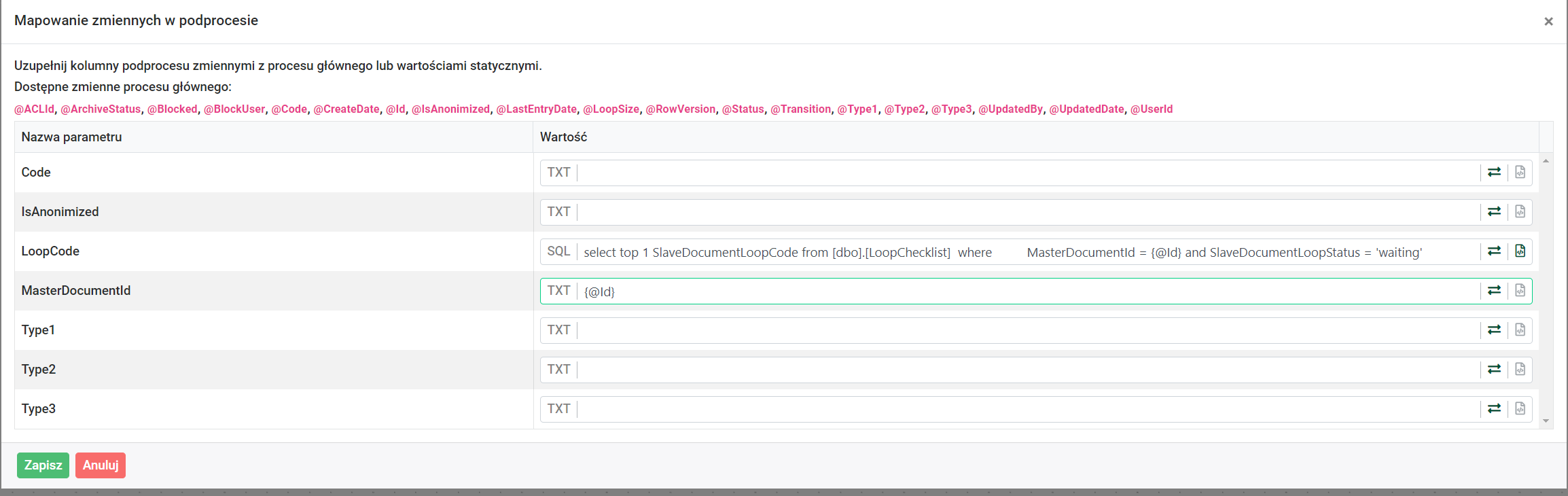
By mapping variables from the main process to the subprocess, the main process identifier (MasterDocumentId) and the document identifier in the subprocess (LoopCode), retrieved from the auxiliary table, will be passed.
The main process must be constructed in such a way, that before the loop starts, the data that will be needed to control the loop are saved in the auxiliary table. In the example shown, the number of subprocesses is determined by the value given in the form field from which the user initiates a subprocess loop ({@LoopSize}). For each loop, a subprocess ID is generated and the *waiting flag is set*.
DECLARE @i INT = 1;
DECLARE @maxIterations INT = {@LoopSize};

WHILE @i <= @maxIterations
BEGIN
  INSERT INTO dbo.[LoopChecklist] (
    [MasterDocumentId]
   ,[SlaveDocumentLoopCode]
   ,[SlaveDocumentLoopStatus]
   )
  VALUES (
    {@Id}
   ,concat({@Code},'_',@i)
   ,'waiting'
   );
SET @i += 1;
END;
The records of this table will be updated in each subprocess initiated with SQL action, which will change the flag to created when a document in the subprocess is created.
UPDATE [dbo].[LoopChecklist]
SET SlaveDocumentLoopStatus = 'created'
WHERE MasterDocumentId = {@MasterDocumentId}
  AND SlaveDocumentLoopCode = {@LoopCode}
In the next step, the main process will go to the decision block, which will check in the secondary table whether there are still records with the waiting flag for the main process ID and select the direction of the transition accordingly.
DECLARE @counter int

SET @counter = (
  SELECT count(Id) from [dbo].[LoopChecklist]
  WHERE MasterDocumentId = {@Id}
    AND SlaveDocumentLoopStatus = 'waiting'
  )

IF @counter > 0
  SELECT 'NextDocument'
ELSE
  SELECT 'EndLoop'
You can also use the auxiliary table in the construction of a synchronization condition.
DECLARE @createdDocuments int
DECLARE @thisProcessDocuments int

SET @createdDocuments = (
  SELECT count(Id) from [dbo].[LoopChecklist]
  WHERE MasterDocumentId = {@Id}
    AND SlaveDocumentLoopStatus = 'created'
  )
SET @thisProcessDocuments = (
  SELECT count(Id) FROM [dbo].[LoopChecklist]
  WHERE MasterDocumentId = {@Id}
  )
IF @createdDocuments = @thisProcessDocuments
  SELECT 1
ELSE
  SELECT 0
There is only one pass from the synchronizer, so a simple instruction is enough to indicate it.
SELECT `FinishProcess`